
Hyundai Palisade (LX2): Floor Console / Console Armrest
Hyundai Palisade (LX2) 2020-2026 Service Manual / Body (Interior and Exterior) / Floor Console / Console Armrest
Components and components location
| Component Location |
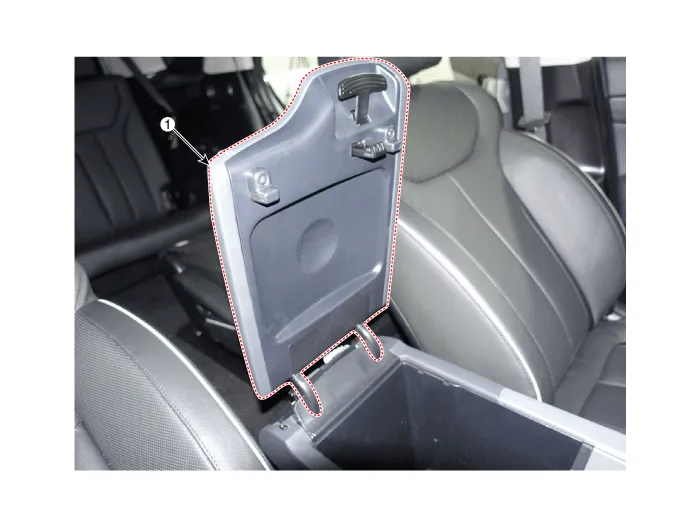
| 1. Console armrest |
Repair procedures
| Replacement |
|

|

| 1. |
Loosen the mounting screws and remove the console armrest (A).
|

| 2. |
To install, reverse removal procedure.
|
Components and components location Component Location 1. Rear console upper cover 2. Rear console under cover Repair procedures Replacement [Upper] • When removing with a flat-tip screwdriver or remover, wrap protective tape around the tools to prevent damage to components.
Other information:
Hyundai Palisade (LX2) 2020-2026 Service Manual: Specification
Hyundai Palisade (LX2) 2020-2026 Service Manual: PTC Heater (Diesel only)
Description and operation Description The PTC (Positive Temperature Coefficient) heater is installed at the exit or the backside of the heater core. The PTC heater is an electric heater using a PTC element as an auxiliary heating device that supplements deficiency of interior heat source in highly effective diesel engi
Categories
- Manuals Home
- Hyundai Palisade Owners Manual
- Hyundai Palisade Service Manual
- Automatic Transaxle System (A8LF1)
- Rain Sensor
- Automatic Transaxle Fluid (ATF)
- New on site
- Most important about car

Copyright © 2026 www.hpalisadelx.com - 0.0111