
Hyundai Palisade (LX2): Wireless Power Charger System / Wireless Charging Lamp
Hyundai Palisade (LX2) 2020-2026 Service Manual / Body Electrical System / Wireless Power Charger System / Wireless Charging Lamp
Components and positions
| Components |
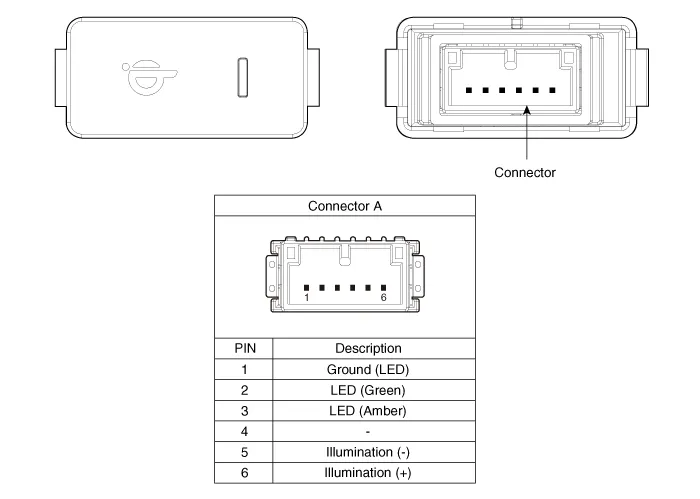
Repair procedures
| Removal |
Handling wireless charging system parts by wet hands may cause electric
shock.
|

| 1. |
Disconnect the negative (-) battery terminal.
|
| 2. |
Remove the floor console upper cover assembly.
(Refer to Body - "Floor Console Assembly")
|
| 3. |
Remove the console tray (A) by using a flat-tip screwdriver.
|

| 4. |
Disconnect the connector (A).
|

| 5. |
Disengage a fixed hook and then remove the wireless charging lamp.
|

| Installation |
| 1. |
Install the wireless charging lamp.
|
| 2. |
Connect the wireless charging lamp connector.
|
| 3. |
Install the floor console upper cover assembly.
|
| 4. |
Connect the negative (-) battery terminal.
|
Components and positions Components Circuit diagram Circuit Diagram Repair procedures Removal Handling wireless charging system parts by wet hands may cause electric shock.
Other information:
Hyundai Palisade (LX2) 2020-2026 Service Manual: Special service tools
Hyundai Palisade (LX2) 2020-2026 Service Manual: Rear Corner Radar Unit
Specifications Specifications [BCW, BCA] Items Blind-Spot Collision Warning (BCW) Blind-Spot Collision- Avoidance Assist (BCA) Rated voltage DC 12V Operating voltage 9V - 16V Operating speed 30 km/h
Categories
- Manuals Home
- Hyundai Palisade Owners Manual
- Hyundai Palisade Service Manual
- Automatic Transaxle System (A8LF1)
- Resetting the Driver's Seat Memory System
- Removing and Storing the Spare Tire
- New on site
- Most important about car

Copyright В© 2026 www.hpalisadelx.com - 0.0187