
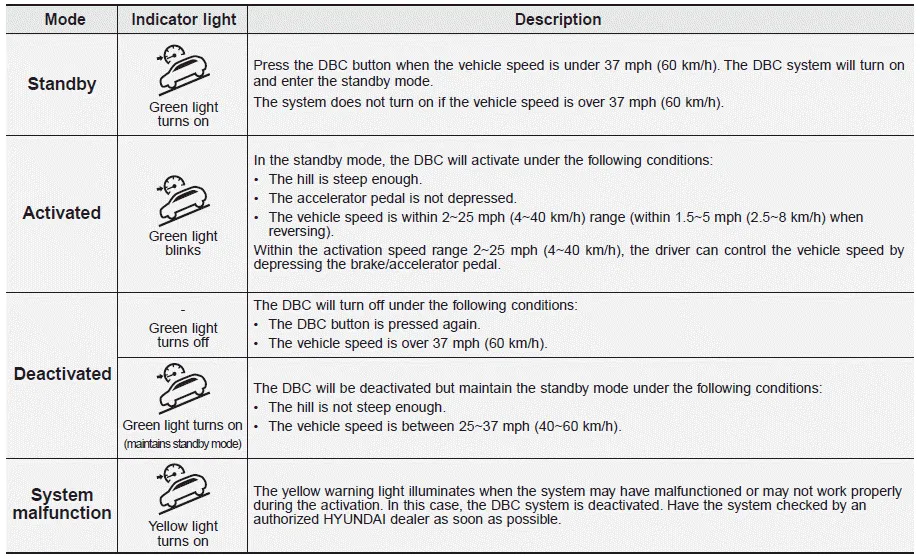
Hyundai Palisade (LX2): Downhill Brake Control (DBC) / DBC operation
Downhill Brake Control disabled. Control vehicle speed
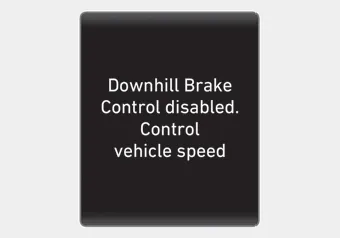
When the DBC system is not working properly this warning message will appear on the LCD display and you will hear a warning sound. If this occurs, control the vehicle speed by depressing the brake pedal.
WARNING
Always turn off the DBC on normal roads. The DBC might activate inadvertently from the standby mode when driving through speed bumps or making sharp curves.
Information
- Noise or vibration may occur from the brakes when the DBC is activated.
- The rear stop light comes on when DBC is activated.
NOTICE
- The DBC may not deactivate on steep inclines even though the brake or accelerator pedal is depressed.
- The DBC system may not always maintain the vehicle speed at a certain speed.
- The DBC does not operate when:
- The gear is in P (Park).
- The ESC is activated.
The Downhill Brake Control (DBC) feature assists the driver to descend down a steep hill without having to depress the brake pedal. The system automatically applies the brakes to maintain the vehicle speed below a certain speed and allows the driver to concentrate on steering the vehicle down hill.
Trailer Stability Assist system helps stabilize the vehicle and trailer when the trailer sways or oscillates. There are various reasons making the vehicle sway and oscillate.
Other information:
Hyundai Palisade (LX2) 2020-2026 Service Manual: Auto Defogging Actuator
Description and operation Description The auto defogging sensor is installed on the front window glass. The sensor judges and sends signal if moisture occurs to blow out wind for defogging. The air conditioner control module receives a signal from the sensor and restrains moisture and eliminates defog by the intake actuato
Hyundai Palisade (LX2) 2020-2026 Service Manual: Front Radar Unit
Specifications Specification Item Specification Power supply (V) 12 Operation voltage (V) 9 - 16 Description and operation Description The smart cruise control unit is installed on the front right-hand side of the chass
Categories
- Manuals Home
- Hyundai Palisade Owners Manual
- Hyundai Palisade Service Manual
- Automatic Transaxle Fluid (ATF)
- Repair procedures
- Rain Sensor
- New on site
- Most important about car
